Showing posts with label scriptvirus. Show all posts
Showing posts with label scriptvirus. Show all posts

In one of my previous post, I shared some information about a new viral script virus and the steps to remove the virus manually. One of the behavior of these script viruses is that you will find hidden shortcuts instead of real folders when you plug your USB or SD Card. Sometimes you cannot open those files. Even if you remove the virus from your PC the folders will remain as shortcuts itself. So we will see How to fix this :-)
If you want to read the steps to remove the virus manually see my previous post : New Potential Script Virus Found : Steps to Remove the Virus Manually
Method I
- Connect the infected USB or SD card to the PC.
- Open Notepad and Copy the following code and paste it into the opened text file.
@echo offattrib -h -s -r -a /s /d drive_letter:\*.*
- Replace the drive_letter in the above code with the drive letter of your infected USB or SD Card (For eg : K, J ,M etc..)
- Save the text file as shortcutfix.bat ( You can use any file name, but the extension .bat is really important)
- Now open the shortcutfix.bat file we created and it will run the command prompt.
- Open your USB/SD Card and you will find all your real folders along will the shortcuts. Now remove the shortcuts and you are done :-)
We have made a video tutorial to illustrate this trick. Watch this :-)
Method II
- Open the command prompt ( Start - Accessories - Command prompt)
- Type attrib -h -s -r -a /s /d drive_letter:\*.*
- Replace drive_letter in the above command with the drive letter of your infected USB or SD Card
- Now Hit Enter and you will find real folders in your USB/ SD Card. Remove the shortcuts and you are done!!
Important : To my knowledge, this tip is compatible only with windows OS. Also you need administrator privilege to run the command or execute the .bat file.
.jpg)
Recently my laptop got affected by a new virus.The sad part is that even the latest Anti viruses couldn't identify this virus.Finally i found one method to manually remove this virus from my PC.Today I am going to share this method with you. I don't know whether this is a absurd method but it worked perfectly fine for me. So here is the trick.
Virus Behavior
Usually the viruses will have some name but i couldn't find a name for this virus.So i will tell you some of the behaviors of this virus.
- Like most of the viruses you cannot open MsConfig ( Start -> Run->type msconfig and click run)
- You will get dialog boxes as shown below frequently or during startup.

- You cannot install new software's if your PC is affected by this virus. The setup will run and will close automatically after sometime.
- When you plug your pen drive you will find shortcuts instead of real folders.Sometimes you cannot open those files.
How to Remove this Virus Manually
This virus is a script virus.
- Run your task manager (ALT+CTRL+DEL)
- Goto Processes. In the list you can find wscript.exe .Select it and End that Process.

- Now Goto ->Start menu and search for msconfig or Goto -> start -> Run -> Type msconfig and click run.
- Goto -> Startup tab->Uncheck the processes shown below. In my PC, the names were 613C and 367. It may change in another system. Also these will have value Unknown under Manufacturer column. Now Click Ok
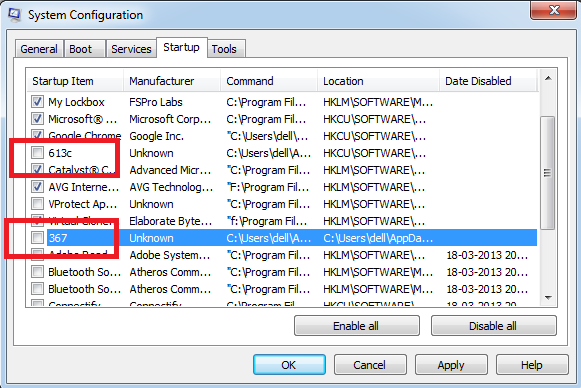
- Now Goto -> C:/Users/xxx(your user account)/Local /Temp . You can find some files with similar names as above in this folder.Remove those files or Clear this Temp Folder completely once. Now you have temporarily disabled the virus. But it is still there in your PC.
To remove the virus completely from your PC
Please Note : The Following method require registry editing so be careful while editing your PC registry.Serious problems might occur if you modify the registry incorrectly! Therefore, i recommend that you backup the current state of your registry.
- Goto start-> Run -> type Regedit and click Run
- Goto Edit -> Find -> type msconfig and click find next (Check only keys)

- Open the msconfig subfolder and here you will find folders called startupreg and startupfolder
- Inside the startupreg folder you can find one of the virus key. In my case its 613C (Right click on 613C and then remove the folder)
- Similarly You can find other virus key inside startupfolder . Delete that key also.
Now the virus is completely removed from your PC :-) Share Your Stories as Comments Below !
Subscribe to:
Posts
(Atom)